Pc Mobile Tablet Blog

Huge Drivers Collection For Pc, Mobile, Tablet, Laptop

Showing posts with label Software. Show all posts

Sunday, November 02, 2014

Download Realtek RTL8723A Bluetooth Software Ver.3.744.744.0 For Windows 7, 8

Free Download Realtek RTL8723A Bluetooth Software Ver.3.744.744.0 For Windows 7, 8

Realtek RTL8723A Bluetooth Software Ver.3.744.744.0 for Windows 7, Windows 8

Chipset: Realtek RTL8723AE
Version: 3.744.744.052913
Release Date: 06/14/2013
Compatibility: Win7 32/64bit, Win8 32/64bit
Description:
Realtek RTL8723A Bluetooth Software for Windows 8 (64-bit), Windows 7 (32/64-bit) – ThinkPad
Download Realtek RTL8723A 4.0 + High Speed Chip Bluetooth Driver for Win7, Win8.
Version: 3.744.744.052913.
Supported Devices:
  • RTL8723A 4.0 + High Speed Chip
Supported Hardware IDs:
  • USB\VID_0A12&PID_0001
  • USB\VID_0BDA&PID_0001
  • USB\VID_0BDA&PID_0002
  • USB\VID_13D3&PID_3386
  • USB\VID_0BDA&PID_8723
  • USB\VID_13D3&PID_3394
  • USB\VID_0930&PID_021D
  • USB\VID_0BDA&PID_A723
  • USB\VID_0BDA&PID_8821
  • USB\VID_0BDA&PID_1724&MI_00
  • USB\VID_0BDA&PID_8725&MI_00
  • USB\VID_0BDA&PID_0723&MI_00
  • USB\VID_0BDA&PID_0724&MI_00
  • USB\VID_0BDA&PID_8821
To Download Click On Given Download Link


Don't Forget To Say Thanks In Comment http://pcmobtab.blogspot.com

Tuesday, August 19, 2014

Free Download New FaceBook Chat Massenger v1.3

The Facebook Messenger, Chit Chat for Facebook makes it possible for you to use Facebook Chat from your desktop like you would Windows Live Messenger or AIM. In addition to enabling you to use Facebook Chat without your web-browser the Facebook Messenger 'Chit Chat for Facebook' provides a variety of other benefits. For example, the software provides status updates - informing you when your Facebook friends sign in or out.


Chit Chat for Facebook

Benefits of Chit Chat for Facebook

  • Fun and Free - Convenient and fun way to chat with your Facebook contacts without the hassle of surfing Facebook
  • Free Your Web-Browser - No need to keep your web browser logged into Facebook
  • Easy To Use - Download, install and then login with your Facebook username and password - easy!
  • Popular? - Swift and fast tabbed chat Interface making it easy to talk to many friends at once
  • Instant Message Notification - Lets you know when you receive an instant message.
Chit Chat for Facebook version 1.3 adds the following benefits:
  • Chat History – Automatically saves your Facebook Chat instant messages
  • Save Conversations –Save your conversations from the instant message window
  • Emoticons – Add meaning to your messages with smileys
  • Formatting – Format your messages in Bold/Underline
  • Status Updates – Automatically update your Facebook status
  • Wall Posting – Quickly post messages to your Facebook friend(s) walls
  • Private Messages – Quickly send private messages to your Facebook friend(s)
In addition the instant messenger update has added:
  • Improved Stability
  • Chat Window/Buddy List Resizing
  • Enable or Disable online and offline status notifications
  • Ability To View or Hide Offline Buddy List
Chit Chat for Facebook allows users to enjoy the convenience and ease of using an instant messenger whilst talking over Facebook Chat.

The popular Facebook instant messenger removes the need to use a web browser in order to use Facebook Chat. Furthermore, the tabbed instant message window and instant message notification functionality make it easier to use than the official browser based Facebook Chat service.

System Requirements
Requires Facebook Login Details. Must Be An Existing Facebook User.

Download Chit Chat For Facebook


Don't Forget To Say Thanks In Comment http://pcmobtab.blogspot.com

Download Viber For PC Free International Calls, Free Messaging Free Text

Viber for PC Now You Can Use Viber From Your PC To  Make Free  International Calls


Viber for PC is an application that can be used to make free calls between two Viber users. Viber users can also send text messages to each other for free. Viber is officially only available for iPhone and Android phones. However, a lot of people want to have Viber on their PCs which does not seem possible easily. However, we have found a way to get Viber for PC now.

You will be able to download Viber for PC and then make free calls and send free text to your friends who use either Viber on their Android or iPhones or Viber for PC. You will be able to communicate with them for free without the need of buying an expensive smartphone to use Viber for Android or Viber for iPhone. You will be able to download Viber for PC and make those calls using a microphone and speaker connected to your PC and you will be able to send Free SMS messages anywhere in the world for free too.
Viber for PC does not have video calls currently to be one of the Skype Alternatives. However, there are a bunch of good Skype alternatives that can make free video conferencing calls.
Anyways, let us get started with Viber for PC download.

Viber for PC  Step by step guide

In order to get Viber on your PC you need to get an Android emulator running on it. With the android emulator, you can install Viber for Android on it and then you can use Viber for Android as if it is Viber for PC.
The emulator will let you make calls to other Viber users. You can register for a Viber account using your PC and then log in to Viber from your Viber for PC only. This way, you will be able to make free calls to anyone using your PC. The another advantage of this method is that you do not need to spend money on a smartphone. You can download the Google Android simulator, or emulator if you will, and then use that to install Viber on your PC.


Watch the video and read the tutorial!

Step 1. Installing BlueStacks

So now when you’ve downloaded BlueStacks somewhere in your computer, install it. After the installation part is finished, open it on your PC. This is how it should look on your desktop:

Download: BlueStacks (99 MB)

Download Blue Stacks (99 MB)

Step 2.Open BlueStacks


Search Search Viber program and install the program.


Write the phone number in the space with which you want to use Viber.


NB The telephone number you enter must be a valid number. If you want to use the same number of your smartphone where you already use Viber, the program is uninstalled from your device to settle only on Bluestacks. The operation is reversible.

At this point you'll get on the phone you have chosen a message with a configuration code to insert.


You just have to write your name and if you want, add a profile picture. 


Ready? Manually enter the number you want to call or select it from your contacts, if prensent in the phonebook, are automatically imported.


Now you can use Viber from your PC just as if it were installed on your smartphone. You can talk with your friends and send messages from your computer in free chat. Really a nice discovery that makes us love it even more this popular program!


Don't Forget To Say Thanks In Comment http://pcmobtab.blogspot.com

Monday, August 18, 2014

Download Realtek RTL8723A Bluetooth Software for Windows 7, Windows 8,

Free Download Realtek RTL8723A Bluetooth Software for Windows 7, Windows 8, Ver.3.744.744.0 

Direct Download Realtek RTL8723A Bluetooth Software for Windows 7, Windows 8, Ver.3.744.744.0

Chipset: Realtek RTL8723AE
Version: 3.744.744.052913
Release Date: 06/14/2013
Compatibility: Win7 32/64bit, Win8 32/64bit
Description:
Realtek RTL8723A Bluetooth Software for Windows 8 (64-bit), Windows 7 (32/64-bit) – ThinkPad
Download Realtek RTL8723A 4.0 + High Speed Chip Bluetooth Driver for Win7, Win8. Version: 3.744.744.052913.
Supported Devices:
  • RTL8723A 4.0 + High Speed Chip
Supported Hardware IDs:
  • USB\VID_0A12&PID_0001
  • USB\VID_0BDA&PID_0001
  • USB\VID_0BDA&PID_0002
  • USB\VID_13D3&PID_3386
  • USB\VID_0BDA&PID_8723
  • USB\VID_13D3&PID_3394
  • USB\VID_0930&PID_021D
  • USB\VID_0BDA&PID_A723
  • USB\VID_0BDA&PID_8821
  • USB\VID_0BDA&PID_1724&MI_00
  • USB\VID_0BDA&PID_8725&MI_00
  • USB\VID_0BDA&PID_0723&MI_00
  • USB\VID_0BDA&PID_0724&MI_00
  • USB\VID_0BDA&PID_8821

To Download Click On Download


Don't Forget To Say Thanks In Comment http://pcmobtab.blogspot.com

Download Aeroadmin Free Remote Desktop Software 2014

Aeroadmin Free Remote Desktop Software 2014 - Free Alternative of Teamviewer


AeroAdmin - FREE and EASY remote desktop software! Set up remote desktop connection within a few seconds!
No installation, no configuration, Firewall friendly, works behind NAT.


AeroAdmin - all-in-one solution for everyday tasks in professional and private life.


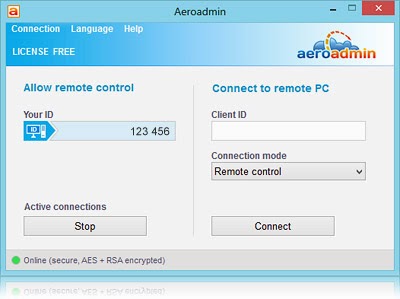
Aeroadmin doesn't require installation and configuration. It's ready for use right after downloading and easily connects computers in different local area networks, behind NAT and Firewalls. License Free Remote Desktop Software No Time Limit For Remote Session over internet.

Find out key Aeroadmin features below.

Screen Shot: 


Compatible with Windows 8
Win 8 compatible

AeroAdmin has passed Windows 8 compatibility test.
Now you're always ready for Windows 8!

Direct Download Alternative to Teamviewer Totally Free Aeroadmin Remote Desktop Control P2P
AeroAdmin - Download
You can download and use AeroAdmin free of charge right after downloading.

Remote desktop control session will be available within a few seconds after software launch

To Download Click On Download Now


Don't Forget To Say Thanks In Comment http://pcmobtab.blogspot.com